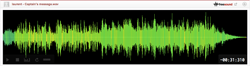
We develop iPhone app that perform musical analysis on recorded audio from the iPhone. Our app implementation make use of the Audio Queue service to receive raw audio buffers from the audio queue callback.
In the first version of our app we had the problem of too much clipping on the recording which degrade the accuracy of our analysis. We also suspected that the noise canceling algorithm in iPhone 5 produce distorted sound, which is not much noticeable by human ear but distorted enough to affect our sensitive algorithm.
We found that the solution to our problem is to set the audio session mode to kAudioSessionMode_Measurement. This session mode is supposed to give maximum freedom for us to control the microphone input, which include turning off the automatic gain control and probably noise canceling as well.
The solution works very well except that it introduce a strange waveform pattern in the beginning of all recordings in iPhone 5. It is very hard to explain the waveform we get, so I made two recordings at Freesound so that you can see it visually. The first recording (this recording) is made in an almost quite environment, and you can see the weird spike in the beginning of the recording. The second recording is made with constant background noise, and you can see that the actual sound wave is offset from the strange curve and gradually increase to its original volume.
This waveform only happens on iPhone 5 devices that we tested, and there is no problem at all for iPhone 4S and older generations. We have tried various settings and the glitch is still unavoidable as long as we set the audio session mode to kAudioSessionMode_Measurement. We also find similar glitch in one of our iPhone 5 devices, in which the glitch happens even if we try to set just the input gain level without changing the session mode.
We are not sure if this is a hardware-related bug in iPhone 5, or if it is fixable software glitch in the future version of iOS. For the moment we are looking for workaround that can avoid this glitch while automatic gain control and noise canceling are disabled.
Type
Ogg Vorbis (.ogg)
Duration
0:02.456
File size
62.8 KB
Sample rate
44100.0 Hz
Bitrate
209 kbps
Channels
Mono
Comments

1 year, 9 months ago
Great sounds to make iPhone ringtones https://chuongdienthoai.net/nhac-chuong-iphone/