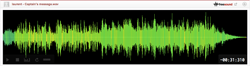
Based on freesound.org's file Synth Kick 3 of the member Hard3eat Soundz.
1. Open the file Synth Kick 3 on WaveLab.
2. Process > Pitch bend (or press the B key). Keep the first 25 msec or 35 msec (attack) unchanged, then immediately drop the pitch -3 semitones and gradually reach -6 semitones at the end.
3. Edit > Trim (Ctrl +BkSp) to make the duration the same as the original or slightly tighter/shorter.
4. Select MultiBand Compressor as the effect, with the soft clip on and render the file. Do not distort too much. We want few extra harmonics, but not too many, because the file becomes unusable (the point is to use the file for years, not to impress yourself momentarily but never actually use it). If you made a mistake press Ctrl + Z. When you make a single mistake, don't continue to make mistakes because sometimes its impossible to reach any specific moment in edit history.
5. Select the end section by pressing the Insert key button at the beginning of the region you want to start editing. Open the end section on Process > Level envelope V and draw the fade out you want. Correct with Ctrl + Z. Sometimes what you imagined isn't correct, so you have to listen. It's considered a higher quality fade out, the double fade out, in which you don't fade immediately to zero ㏈, but to some value, and then you apply a final fade out. It sounds more natural. It's better to draw your fade envelope, especially when the waveform is intricate/complex.
Type
Wave (.wav)
Duration
0:00.312
File size
57.8 KB
Sample rate
44100.0 Hz
Bit depth
16 bit
Channels
Stereo
Comments